
How do I change or cancel my Arlo subscription plan?
Last updated: 13.01.2026
If you’re experiencing any technical issues or other concerns that are affecting your Arlo Secure experience, our support experts are here to help. We’d love the opportunity to address the issue and ensure you’re getting the full value of your plan. Click here, and login to get in touch with us!
When you unsubscribe from your Arlo plan, all recordings in the Arlo cloud are deleted within 48 hours of the subscription end date. If you want to save your recordings, download them within this period.
- Your subscription remains active until the end of your billing period. You will not be charged again unless you restart it.
- Changes or cancellations must be made through the same method (web or app) where you initially subscribed.
- Arlo Support cannot make changes or cancel your plan for you.
Manage Your Subscription
On my.arlo.com
- Log in at my.arlo.com.
- Click Secure > My Arlo Account.
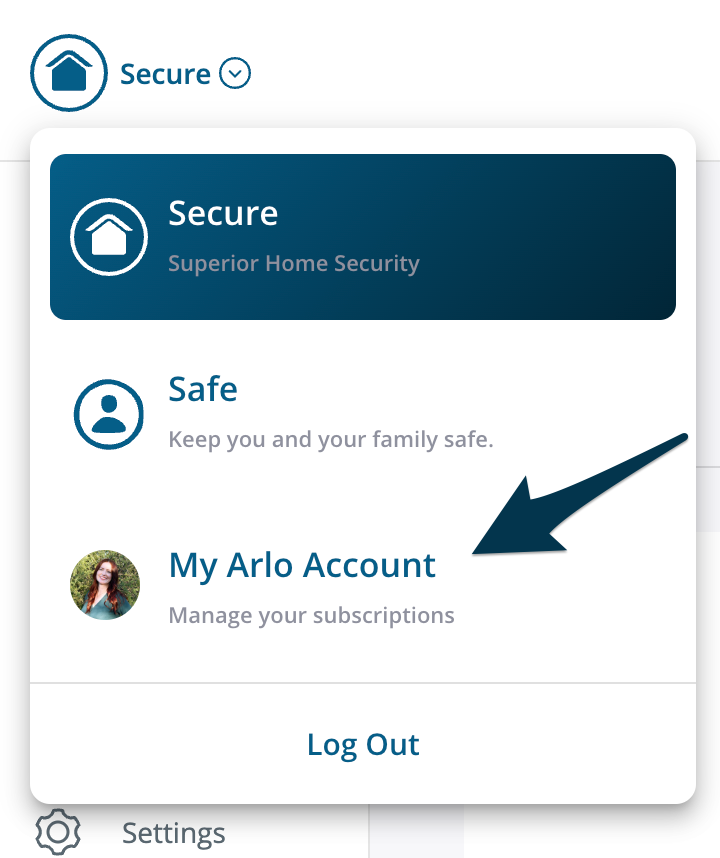
- Choose one of the following actions:
- Change Plan: Click Change Plan, adjust your services, and follow the on-screen instructions.
- Cancel Subscription: Click Cancel Subscription and follow the on-screen instructions.
- Cancel a Trial: Click Change Plan, then select Cancel Trial (for a single camera) or Cancel All Trials, and confirm the cancellation.
Using the Arlo Secure App
- Launch the Arlo Secure App.
- Tap
 and select your Location.
 - Tap Plan and choose one of the following actions:
- Change Plan: Tap Modify Plan and follow the on-screen instructions.
- Cancel Plan: Tap Modify Plan, then select Cancel Plan, and follow the on-screen instructions.
For more details about subscription options, visit: Arlo Secure Plans