
This FAQ applies to the new Arlo Essential Security Camera (3rd Gen).
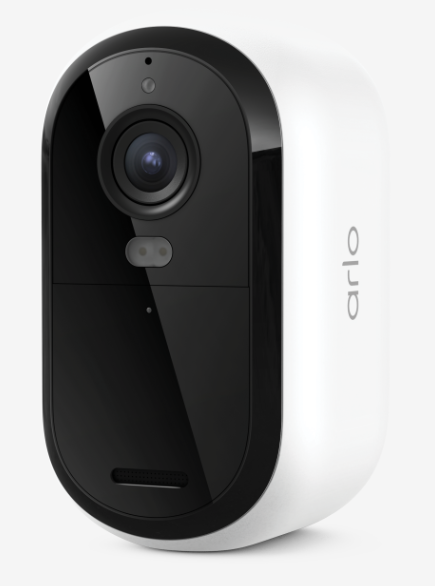
What new Arlo Essential Security Camera (3rd Gen) models are available?
- Arlo Essential Security Camera 2K (3rd Gen) (VMC3080)
- Arlo Essential XL Security Camera 2K (3rd Gen) (VMC3082)
- Arlo Essential Security Camera HD (3rd Gen) (VMC2080)
- Arlo Essential XL Security Camera HD (3rd Gen) (VMC2082)
What is the difference between the four 3rd Gen Arlo Essential Security Cameras?
Arlo Essential Security HD (3rd Gen) and Arlo Essential XL Security HD (3rd Gen) camera models capture video in 1080p resolution. Arlo Essential Security 2K (3rd Gen) and Arlo Essential XL Security 2K (3rd Gen) capture video in 2K resolution. All models have an aspect ratio of 16:9.
The Arlo Essential XL Security 2K and HD cameras come with an integrated extra-length (XL) battery, which provides additional battery life.
What are the key features of the Arlo Essential Security Camera (3rd Gen)?
- Motion Detection Alerts
- Color Night Vision
- Noise-Canceling Audio
- Integrated Spotlight
- Integrated Siren
- Weather Resistant
- Direct to Wi-Fi Connection
Are the Arlo Essential Security (3rd Gen) cameras completely wire-free?
Yes. The Arlo Essential Security (3rd Gen) cameras are fully wire-free and powered with an integrated battery. However, you can use the Arlo 25 ft. Essential Outdoor Charging Cable to keep your camera battery charged outdoors. For more information, visit: How do I charge my Arlo Essential Security Camera (3rd Gen)?
Can I use the Arlo Essential Security (3rd Gen) cameras indoors and outdoors?
Yes. The Arlo Essential Security (3rd Gen) cameras are weather-resistant, wire-free, and outdoor compatible. They do not require a continuous AC power connection.
What is the minimum upload bandwidth required?
You must have a high-speed Internet connection that can sustain a minimum of 2 Mbps upload per Arlo Essential Security Camera (3rd Gen). For more information, visit: What are the minimum requirements for installing and using my Arlo system?
Do I need an Arlo SmartHub to use the Arlo Essential Security Camera (3rd Gen)?
No. You can connect the Arlo Essential Security Camera (3rd Gen) directly to your 2.4 GHz or 5GHz Wi-Fi network without the need for an Arlo SmartHub. You can connect your camera to the VMB5000 or VMB4540 SmartHub.
What are the benefits of connecting my Arlo Essential Security Camera (3rd Gen) to an Arlo SmartHub?
The Arlo SmartHub enhances security by establishing a secure, personal network alongside your router. The Arlo SmartHub also helps to regulate Wi-Fi traffic, can improve battery life, and is compatible with local storage.
For more information, visit: What are the benefits of using an Arlo SmartHub or Base Station?
How wide is the Arlo Essential Security Camera (3rd Gen) viewing angle?
The camera lens provides a 130-degree field of view (FOV).
How much longer does the Arlo Essential XL Security Camera (3rd Gen) battery last?
The Arlo Essential XL Security Camera 2K and Essential XL Security Camera HD come with an integrated extra-length (XL) battery that lasts 16 to 24 months with typical usage. The Arlo Essential Security Camera HD (3rd Gen) and Arlo Essential Security Camera 2K (3rd Gen) both come with an integrated battery that lasts four to six months without charging.
Can I remove the battery in my Arlo Essential Security (3rd Gen) camera?
No. The battery in your Arlo Essential Security Camera (3rd Gen) is fully integrated and cannot be removed. You can recharge the Arlo Essential Security Camera (3rd Gen) with the indoor charging cable that is included with the camera. For more information, visit: How do I charge my Arlo Essential Security Camera (3rd Gen)?
What kind of charging cable can I use with my Arlo Essential Security Camera (3rd Gen)?
Your Arlo Essential Security Camera (3rd Gen) comes with a USB-C charging cable that you can use to charge your camera indoors. You can also use the Arlo Essential Outdoor Charging Cable or an Arlo Solar Panel to keep your camera charged outdoors.
What kind of power adapter can I use with the indoor charging cable that came with my camera?
To charge your Arlo Essential Security Camera (3rd Gen), plug the included charging cable into any USB power source. Power sources with higher wattage charge your camera faster. Arlo recommends using at least 5V-2A. For more information, visit: How do I charge my Arlo Essential Security Camera (3rd Gen)?
Can I use my Arlo Essential Security Camera (3rd Gen) to cross-trigger other Arlo cameras?
Yes. You can set your other Arlo cameras to record when your Arlo Essential Security Camera (3rd Gen) detects motion.
What mounting options are available with my Arlo Essential Security Camera (3rd Gen)?
Your Arlo Essential Security Camera (3rd Gen) comes with an adjustable screw mount that you can use indoors or outdoors. You can also visit Arlo.com to search for additional mounting accessories. For more information about mounting your camera, visit: How do I mount my Arlo Essential Security Camera (3rd Gen)?
What smart home and voice assistant systems can I use with the Arlo Essential Security Camera (3rd Gen)?
The Arlo Essential Security Camera (3rd Gen) is compatible with Apple Home, Amazon Alexa, Google Home, Samsung SmartThings, and If This Then That (IFTTT).
For more information, visit: What smart home and voice assistant systems can I use with my Arlo devices?