
The Total Security Mount locks your Arlo camera into place to help prevent tampering and theft. The locking mechanism requires the included security key to remove your camera and mount.
To install the Arlo Total Security Mount:
- Place the back plate against the wall, with the arrow pointing up, and secure it with screws.
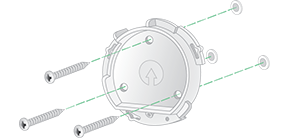
Note: If you are mounting your Total Security Mount on drywall, we recommend using the included wall anchors. - Insert your camera into the Total Security Mount housing.
- To attach the housing to the back plate:

- Align the small screw on the mount and the dot on the back plate.
- Turn the housing clockwise, until it clicks in place.
- Use the included security key to tighten the small screw.
- Adjust the camera position, then finger-tighten the mount lock (clockwise) to lock the camera in position.
To release your camera from the camera housing:
- Insert the security key into the bottom of the camera and turn the key until the camera releases from the camera housing.
- Carefully pull the camera from the camera housing.

To uninstall your Total Security Mount:
- Use the security key to loosen the screw at the bottom of the Total Security Mount.

- Turn the mount and camera housing counter clockwise, and pull it from the back plate.

- Unscrew the screws from the back plate, and remove the back plate from your wall.