
How do I use my Arlo Total Security Mount?
The Total Security Mount locks your camera into place to help prevent tampering and theft. The locking mechanism requires a key to remove your camera and mount, so you can install your camera without worry.
- Place the back plate against the wall, with the arrow pointing up, and secure it with screws.
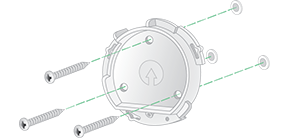
Note: If you are mounting your Total Security Mount on drywall, we recommend using the included wall anchors. - Insert your camera with its battery into the Total Security Mount housing.
- To attach the housing to the back plate:

- Align the small screw on the mount and the dot on the back plate.
- Turn the housing clockwise, until it clicks in place.
- Use the security key to tighten the small screw.
Note: The security key came in the package with your Total Security Mount.
- Adjust your camera position, then finger-tighten the mount lock (clockwise) to lock the camera in position.
- Insert the security key into the release button.
Note: The security key came in the package with your Total Security Mount. - Turn the security key clockwise until the camera is released from the camera housing.
- Carefully pull the camera from the camera housing.

- Use the security key to loosen the screw at the bottom of the Total Security Mount.

- Turn the mount and camera housing counter clockwise, and pull it from the back plate.

- Unscrew the screws from the back plate, and remove the back plate from your wall.