
This product tour shows images of the Arlo Essential Security Camera 2K/HD (3rd Gen) (VMC3080/VMC2080). The information is also applicable to the Arlo Essential XL Security Camera 2K/HD (3rd Gen) (VMC3082/VMC2082).
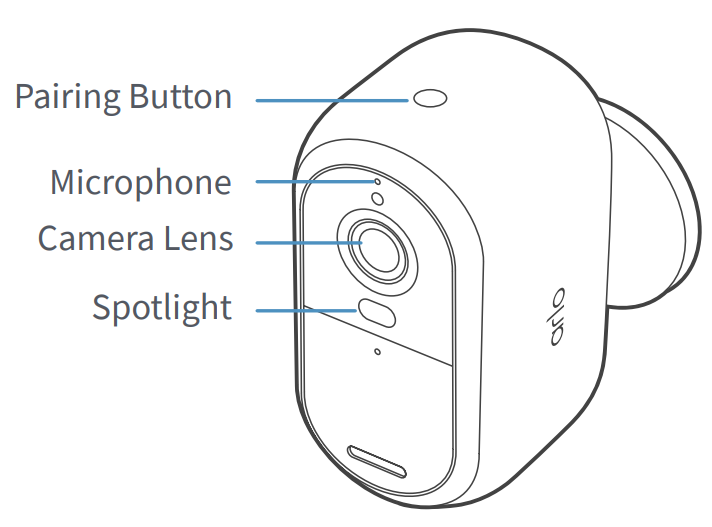
Pairing Button: Use the pairing button to install and factory reset the camera.
Microphone: Use the camera microphone and the Arlo Secure App to have a two-way conversation with a visitor.
Camera Lens: View your videos in full HD or 2K resolution with a 130-degree field of view.
Spotlight: Activate the integrated spotlight manually, or set it to trigger when motion is detected.
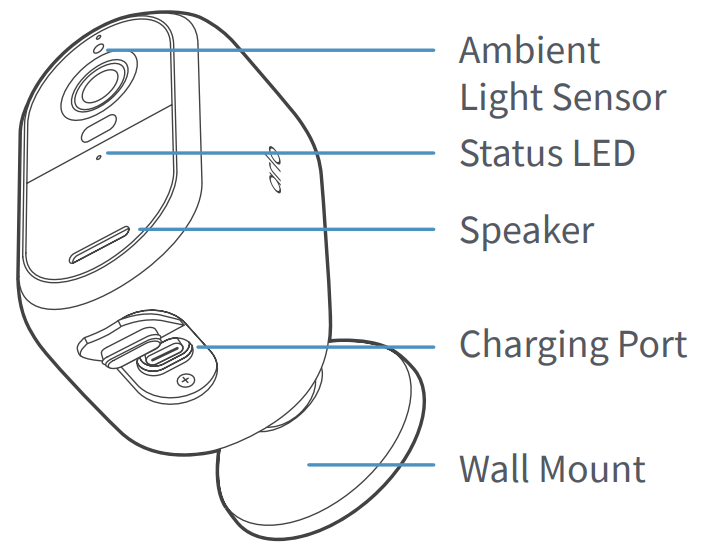
Ambient Light Sensor: The ambient light sensor is used to determine when to trigger the integrated spotlight.
Status LED: Determine the status of your Arlo camera by referring to the LED indicator.
Speaker: Deter intruders by activating the siren on the integrated speaker.
Charging Port: Use the charging port to charge the camera battery.
Wall Mount: Use the included mounting plate and screws to mount the camera on a wall.