
After you have installed and mounted the Arlo Essential Solar Camera using the step-by-step in-app guidance in the Arlo Secure App, ensure the camera is properly positioned for proper solar charging and motion detection.
Positioning Tips for Solar Charging
The amount of energy that the integrated solar panel on your camera can produce depends on several factors:
- Average sun exposure
- Weather conditions
- Dust or debris
- Tilt angle
Depending on settings, use, activity captured, and environment, the Arlo Essential Solar Camera operates on as little as 2 hours of direct sunlight per day.
Ensure the mounting location provides direct sunlight to the camera.
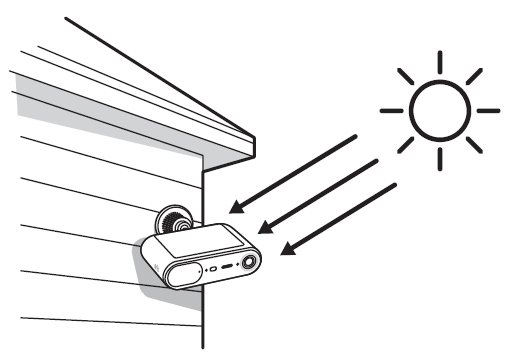
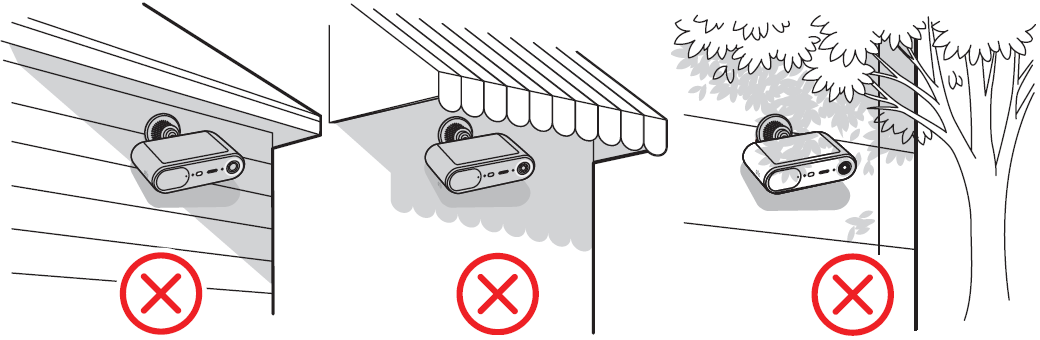
Make sure shade is not covering the camera for a significant portion of the day. No obstructions should be blocking the sunlight from reaching the solar camera. For optimal performance, avoid using the camera in shaded areas, under eaves or roof overhangs, covered porches or patios, under heavy tree shade or branches, or in tight side yards that are between buildings.
On a sunny day, stream your camera in the Arlo Secure App multiple times throughout the day and check the sun icon.
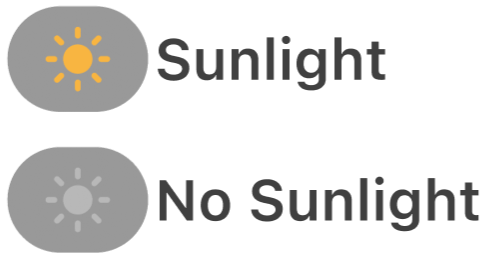
- If the icon continually indicates no sunlight, move the camera to a sunnier location.
- For best results, angle the top of the camera more towards the sun when possible.
Wipe the solar panel on a regular basis to remove dust or debris that might affect the solar energy-harvesting efficiency of the panel.
Positioning Tips for Motion Detection
Ensure your camera is mounted at least 7 feet (2 meters) high and aim it slightly downward for the best sensor performance.
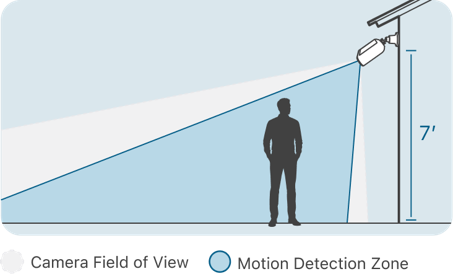
To detect motion closer to the camera, aim it so motion appears in the lower two-thirds of the image. To detect motion farther away, aim it a bit higher, but make sure motion still appears in the lower two-thirds of the image.
- The camera’s motion sensor is more sensitive with subjects moving from side-to-side, across its field of view.
- Objects like walls, light fixtures, or eaves should not be within 2.5 inches (6.4 cm) of the sides or front of your camera, as this may cause glare or hazy video.